Some organizations have security measures that prevent staff from using their Microsoft login to authenticate with other applications. If this is the case, you will see this message after entering your Microsoft credentials:
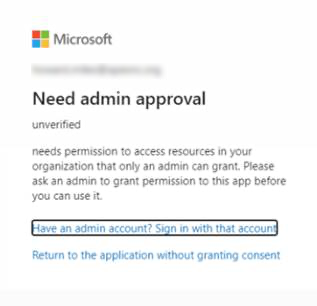
To address this issue:
1. First, make sure the email address you are entering is the primary address associated with your Microsoft account. Some organizations allow you to have a primary email address (e.g. hmcnair@cloudgeneration.com) as well as an alias (e.g. heather@cloudgeneration.com). Only the primary address will work for authentication.
2. If you have verified you are using the correct address and still receive this message, you will need to have the Cloud Generation application approved by your account administrator. Please contact your IT team and ask them to approve Cloud Generation's use of your Microsoft login to authenticate to your Cloud Generation account. We require only Read-Only access to email, first and last name.
3. If they are unable to authorize your Microsoft login for this purpose, please use one of the other login methods (Google or LinkedIn). If necessary, you can create a new Microsoft account at https://signup.live.com and tie any email address to it, whether it's a Microsoft address or not.